Intro & Price:
The Focusrite Vocaster Two is a purpose-built audio interface designed specifically for podcasters and streamers.
Priced by retailer between $190 to $250.
It’s perfect for podcasters seeking more than a simple interface but not requiring the complexity of high-end units, the Vocaster Two offers an appealing middle ground.
What’s in the Box:
- Focusrite Vocaster Two interface
- 1-meter (3-foot) USB-C to USB-A cable
- Documentation
Build Quality / Walkthrough:
The Vocaster Two boasts solid build quality with a plastic casing made from recycled materials. It features a compact design that doesn’t take up much desk space.
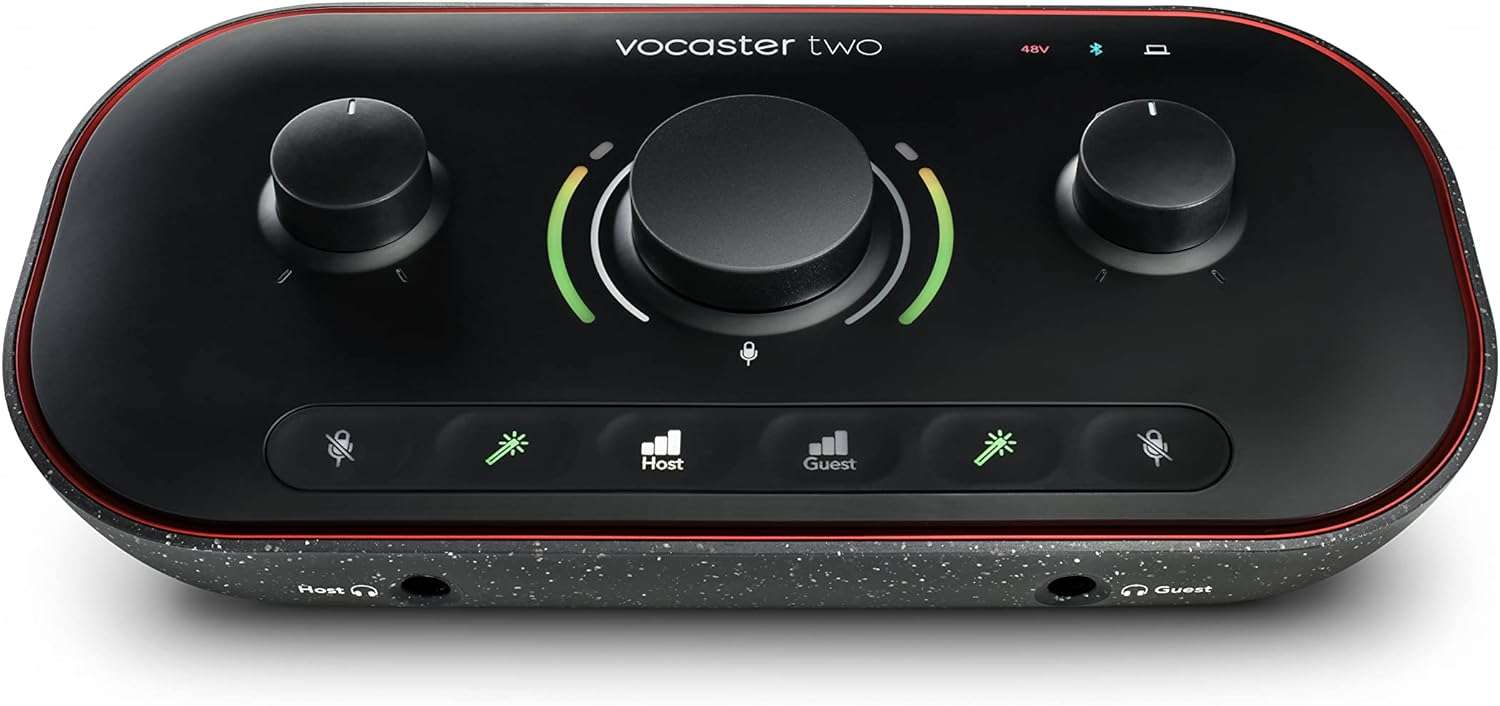
The front panel houses two 1/4″ headphone outputs for host and guest, a large central gain control knob, and buttons for mute, enhance, and channel selection.
The rear panel includes:
- Power switch
- USB-C port
- Bluetooth pairing button
- 3.5mm aux input
- Phantom power switches
- Two XLR microphone inputs
- Left/right 1/4″ monitor outputs
- 3.5mm TRS camera output
The interface’s layout is intuitive, with easily accessible controls for essential functions. The large central knob and clear visual feedback make gain adjustment straightforward.

Specifications:
- Two XLR microphone inputs
- 70 dB gain range (plenty of power for the most demanding mics)
- 24-bit/48 kHz recording
- Phantom power (48V) for each channel
- Bluetooth connectivity
- 3.5mm aux input for mobile devices
- Two 1/4″ headphone outputs
- Left/right 1/4″ monitor balanced outputs
- 3.5mm TRS camera output
- USB-C connection
Apps and Software:
The Vocaster Two comes with the Vocaster Hub app, which is essential for accessing advanced features:
Vocaster Hub mixer app allows control over input levels, apply enhancement presets, and manage routing for remote guests and loopback audio.
The Hub app has a clean interface for adjusting levels, applying audio enhancements, and managing Bluetooth and loopback routing. But most of the setting are presets and don’t allow for fine tuning.
The meters have no scale on them which makes it difficult to measure and calibrate what you are doing.
Auto Gain Feature
The auto gain feature is a standout, especially for newer podcasters.
By speaking for 10 seconds, the interface automatically sets an appropriate gain level.
While it tends to set levels conservatively, it provides a great starting point that can be fine-tuned manually. This feature simplifies setup and helps prevent common issues like distortion from excessive gain.
It’s going to save you a heap of time and it’s wonderful to use.
Recording Remote Guests
The Vocaster Two excels in its ability to handle remote guests.
It can record up to three remote guests simultaneously in multitrack, which is impressive for its price point. The interface offers several options for connecting guests:
- 3.5mm aux input for hardwiring a phone
- Bluetooth connectivity for wireless phone connection
- Two loopback channels for routing audio from computer applications
This flexibility makes it easy to incorporate remote guests into your podcast, whether they’re calling in or joining via online platforms.
Overall Pros & Cons
Pros:
- Excellent value for its feature set
- User-friendly design and controls
- Impressive gain range (70 dB) suitable for gain-hungry mics like the SM7B
- Auto gain feature simplifies setup and use
- Multiple options for recording remote guests
- Built-in audio enhancement presets
- Dedicated camera output for video podcasts
- Bluetooth connectivity
- Intuitive Vocaster Hub app
Cons:
- No combo input jacks (XLR only)
- Limited customization of audio enhancement presets
- No onboard recording capability (requires a computer)
- Plastic build may not feel as premium as metal alternatives
- No scales on the meters
The Competition
The nearest competitor, at this price point, is the Zoom Podtrak P4 at around $200.
The P4 has four XLR inputs and allows for two remote guests (compared to the Vocaster’s three). It allows on-board recording to an SD card so you don’t need a computer.
However the Vocaster records up to a sample rate of 24-bit 48kHz compared to the P4 16-bit 44.1 kHz which – this is something video podcasters and streamers need to bear in mind when hooking up to their camera rigs.
The Vocaster has a cleaner pre-amp than the P4 which means less self-noise. And it has built in Bluetooth. The P4 doesn’t have Bluetooth so you have to by a separate dongle from Zoom.
The Podtrack has programmable sound pads but the Vocaster’s loopback function can provide the equivalent feature.

Best Suited For
The Focusrite Vocaster Two is ideal for:
- Beginner to intermediate podcasters looking to upgrade from basic USB mics or interfaces
- Podcasters who frequently incorporate remote guests
- Content creators who produce both audio and video podcasts
- Streamers seeking a dedicated audio interface with podcast-friendly features
- Mobile podcasters who need a compact, feature-rich solution
- Podcasters and streamer who want a simple but clean and powerful interface with one button options (like auto gain) that will save them time.
It’s less suitable for advanced users requiring extensive routing options or those focused on music production.
Overall Thoughts & Recommendation:
The Focusrite Vocaster Two is a well-designed, podcast-centric audio interface that offers excellent value for its price point.
It strikes a balance between simplicity and functionality, making it an attractive option for podcasters looking to elevate their audio quality and workflow.
Its standout features include the intuitive auto gain function, flexible remote guest recording capabilities, and the useful Vocaster Hub app.
While it may lack some advanced features found on more expensive units, it covers all the essentials for producing high-quality podcasts.
For podcasters who don’t need the extensive features of something like the Rodecaster Pro II but want more than a basic interface, the Vocaster Two is an excellent choice.
It’s particularly appealing for those who regularly incorporate remote guests into their shows.
Leave a Reply